Flutter WebView 广告点击穿透(上)
前言
最近和前端leader一起对穿山甲 GroMore 广告 SDK 做了封装,让它能更符合公司 Flutter 项目的需求,插件flutter_gromore。穿山甲 GroMore 能让我们接入多家广告网络,可以根据竞价进行流量分配以增加广告收入,还是挺不错的,我们自己使用了穿山甲、优量汇、广点通的广告,但是穿山甲广告使用WebView实现,它在 iOS 上存在点击穿透的问题。
最开始我并不知道是WebView出现的点击穿透,后面发现优量汇、广点通的广告没有这个问题才发现是穿山甲使用了WebView的原因。然后我查看 Flutter 的一些 Issue ,发现一些有关这个问题的讨论:flutter#58659、flutter#91681等,另外也发现 Flutter PlatformView 的一些性能问题:flutter#107486、flutter#103014、flutter#101776,信息流广告有卡顿掉帧问题,在这个googleads-mobile-flutter中我发现谷歌广告可能也用了WebView,后面有时间可以看看它有么有穿透问题。
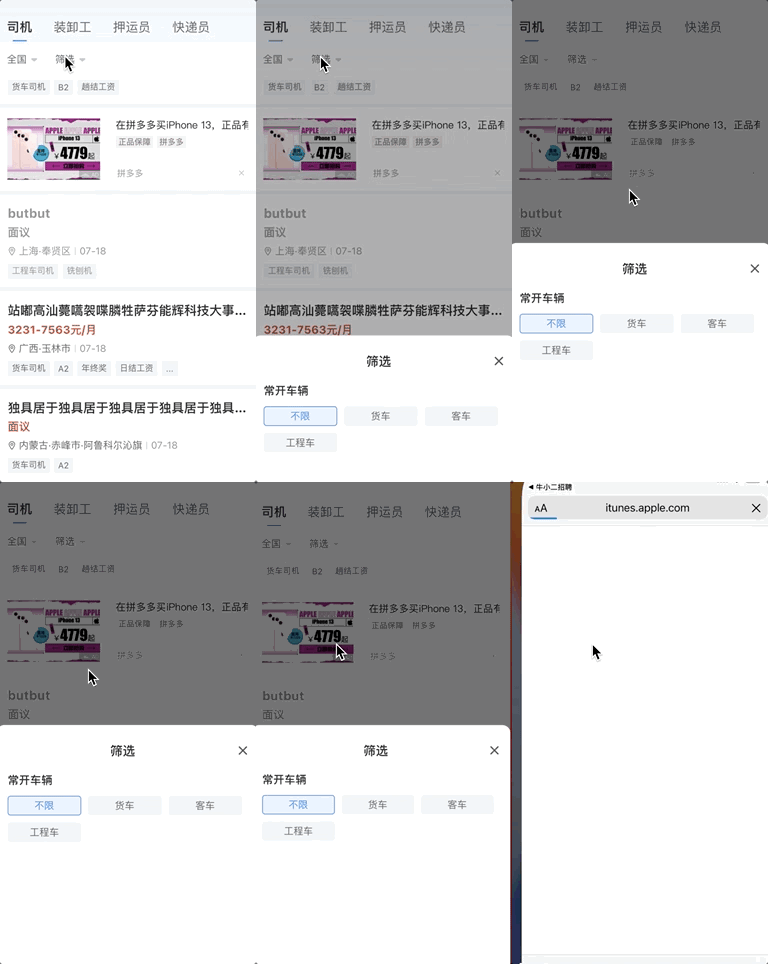
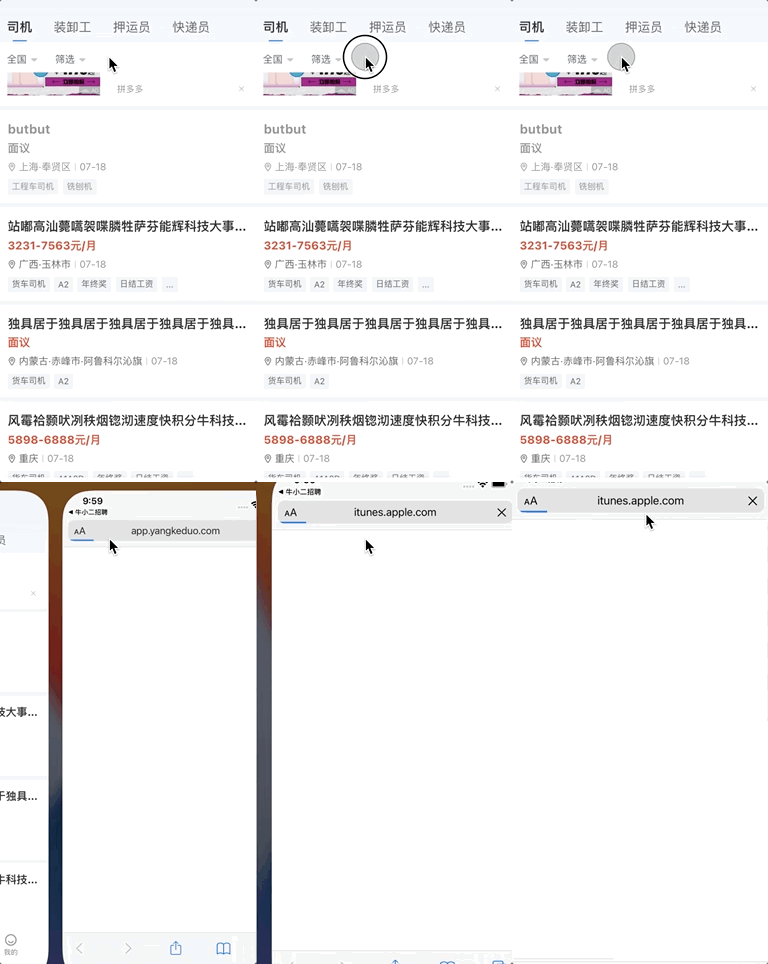
针对WebView广告在Flutter上点击穿透,我想到一个方法来弥补这个问题,治标,能暂时解决问题。
限制可点击区域
我也尝试了一些方法来拦截WebView的触摸响应,可能我思想有点局限不知道怎么分辨哪些情况下的触摸是穿透的。我只想知道什么情况是真正点击到广告视图的,所以想得到广告视图渲染后的可见区域,尝试看了看 iOS 有没有提供什么方法,感觉有点麻烦,然后发现谷歌的一个插件visibility_detector能完成这个需求。
Flutter 渲染后可见界限
使用visibility_detector插件探测信息流广告的可见区域,visibility_detector插件提供的onVisibilityChanged回调方法中VisibilityInfo提供了visibleFraction可见部分 0~1 、visibleBounds可见界限,然后把信息流广告的UiKitView包在里面。
class GromoreFeedView extends StatefulWidget {
final Map<String, String> creationParams;
final GromoreFeedCallback callback;
const GromoreFeedView({
Key? key,
required this.creationParams,
required this.callback,
}) : super(key: key);
@override
State<GromoreFeedView> createState() => _GromoreFeedViewState();
}
class _GromoreFeedViewState extends State<GromoreFeedView> {
final UniqueKey _detectorKey = UniqueKey();
@override
Widget build(BuildContext context) {
String viewType = FlutterGromoreConstants.feedViewTypeId;
return Platform.isAndroid
? const SizedBox.shrink()
: VisibilityDetector(
key: _detectorKey,
child: UiKitView(
viewType: viewType,
creationParams: widget.creationParams,
creationParamsCodec: const StandardMessageCodec(),
onPlatformViewCreated: (id) {
GromoreMethodChannelHandler<GromoreFeedCallback>.register(
'$viewType/$id', widget.callback);
}),
onVisibilityChanged: (VisibilityInfo visibilityInfo) {
print(visibilityInfo.visibleFraction);
print(visibilityInfo.visibleBounds);
},
);
}
}
这样就能拿到广告真正显示的区域了,visibleBounds是一个Rect类型,我们可以拿到top、left、width、height数据~,然后传给 iOS 端来根据它们拦截触摸事件。
iOS 根据可见区域拦截触摸
新增一个FlutterGromoreIntercptPenetrateView视图来代替信息流广告FlutterPlatformView返回的UIView,用它来拦截点击穿透,因为暂时只有穿山甲使用WebView有这个问题,所以加一个isPermeable属性,在 GroMore SDK 的回调中根据adnName判断广告类型,是穿山甲就赋为true。
class FlutterGromoreIntercptPenetrateView: UIView {
var isPermeable: Bool = false
var isCovered: Bool = false
var visibleBounds: CGRect = CGRect.zero
init(frame: CGRect, methodChannel: FlutterMethodChannel) {
super.init(frame: frame)
methodChannel.setMethodCallHandler(handle(_:result:))
}
required init?(coder: NSCoder) {
super.init(coder: coder)
}
func handle(_ call: FlutterMethodCall, result: @escaping FlutterResult) {
switch call.method {
case "updateVisibleBounds":
let args: [String: Any] = call.arguments as! [String: Any]
isCovered = args["isCovered"] as! Bool
visibleBounds = CGRect(x: args["x"] as! Double, y: args["y"] as! Double, width: args["width"] as! Double, height: args["height"] as! Double)
result(true)
default:
result(FlutterMethodNotImplemented)
}
}
override func point(inside point: CGPoint, with event: UIEvent?) -> Bool {
if isPermeable {
let windowPoint: CGPoint = convert(point, to: Utils.getVC().view)
if isCovered && !visibleBounds.contains(windowPoint) {
return false
}
}
return true
}
}
有关使用这个拦截视图的地方可以看插件库FlutterGromoreFeed.swift,之后有好方案会继续更新。
Flutter 方法通道更新界限
我们在onVisibilityChanged时更新 iOS 端管理的可见区域数据:
class _GromoreFeedViewState extends State<GromoreFeedView> {
final UniqueKey _detectorKey = UniqueKey();
MethodChannel? _methodChannel;
@override
void initState() {
VisibilityDetectorController.instance.updateInterval =
const Duration(milliseconds: 100);
super.initState();
}
@override
Widget build(BuildContext context) {
String viewType = FlutterGromoreConstants.feedViewTypeId;
return Platform.isAndroid
? const SizedBox.shrink()
: VisibilityDetector(
key: _detectorKey,
child: UiKitView(
viewType: viewType,
creationParams: widget.creationParams,
creationParamsCodec: const StandardMessageCodec(),
onPlatformViewCreated: (id) {
final String channelName = "$viewType/$id";
_methodChannel = MethodChannel(channelName);
GromoreMethodChannelHandler<GromoreFeedCallback>.register(
channelName, widget.callback);
}),
onVisibilityChanged: (VisibilityInfo visibilityInfo) {
if (!mounted) return;
final bool isCovered = visibilityInfo.visibleFraction != 1.0;
final Offset offset = (context.findRenderObject() as RenderBox)
.localToGlobal(Offset.zero);
_methodChannel?.invokeMethod('updateVisibleBounds', {
'isCovered': isCovered,
'x': offset.dx + visibilityInfo.visibleBounds.left,
'y': offset.dy + visibilityInfo.visibleBounds.top,
'width': visibilityInfo.visibleBounds.width,
'height': visibilityInfo.visibleBounds.height,
});
},
);
}
}
onVisibilityChanged间隔默认是500ms,我们可以通过VisibilityDetectorController.instance.updateInterval修改,也可以通过notifyNow方法手动触发。
拦截触摸后效果
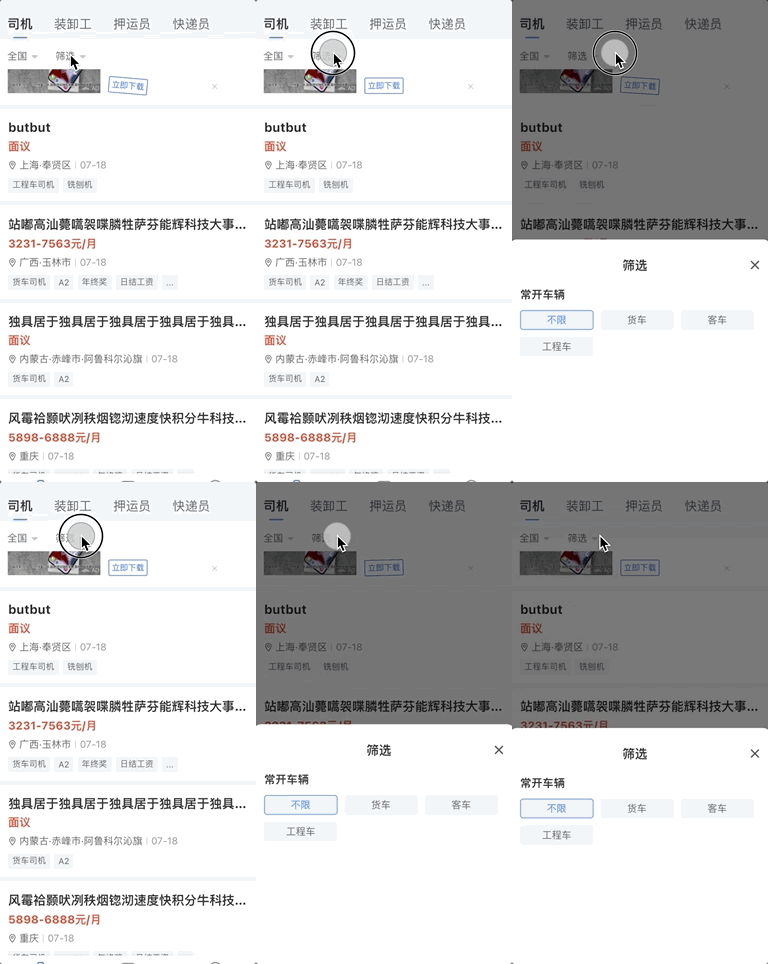
被 Flutter 的Widget覆盖时能正确控制可点击区域,不会再出现点击穿透问题。
但是由于visibility_detector插件对Overlay覆盖探测不了,所以在被Overlay这种部件覆盖时点击广告还是会出现点击穿透。
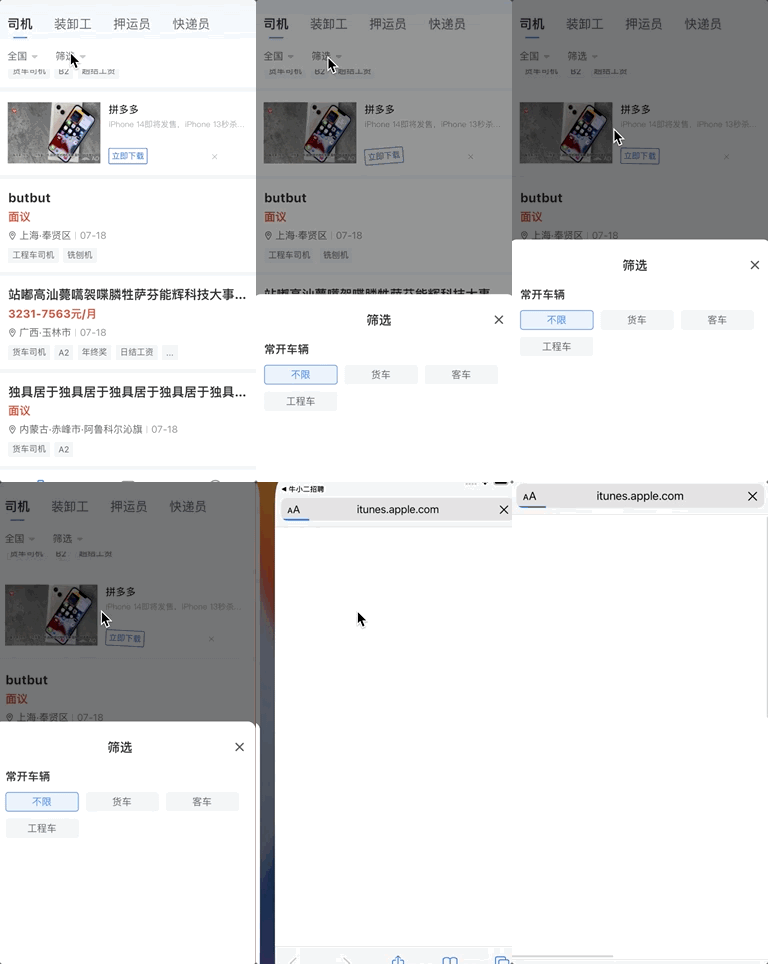
针对这个问题我根据FlutterPlatformView渲染后形成的FlutterOverlayView尝试解决,可见Flutter WebView 广告点击穿透(下)。
版权声明:
Cody's Blog文章皆为站长Cody原创内容,转载请注明出处。
包括商业转载在内,注明下方要求的文章出处信息即可,无需联系站长授权。
请尊重他人劳动成果,用爱发电十分不易,谢谢!
请注明出处:
本文出自:Cody's Blog
本文永久链接:https://okcody.com/posts/frontend/22